 Puresys纯净系统-软件下载
介绍
官方网站:https://github.com/TypesettingTools/Aegisub/
Aegisub 同时是业界公认的一款字幕制作软件,其被各字幕组和字幕制作爱好者广泛应用于演唱会、OP、PV、电视剧、动漫等方面的字幕制作中。
Aegisub 被设计用来制作字幕时间轴和各种样式,以及卡拉 OK 效果。Aegisub 的标准格式是 Advanced SubStation Alpha(即ASS字幕)格式,此种格式可以记录字幕位置信息和样式信息。另外aeg还支持其他的常见字幕格式,例如SubRip、SRT等。它可以凭视频和音频两种方式来计时,你可以用多种音视频解码器来解码,例如 FFmpeg 和 Avisynth。Aegisub 也可透过Lua、Perl 和 Ruby 编程语言来扩充功能。
在字幕组中,Aegisub 用于翻译,时间轴,编辑,排版,校对,卡拉OK计时以及卡拉OK特效。但许多字幕组也用其它的各种软件来代替它,例如使用 Adobe After Effects 进行排版,或用一个简单的文本编辑器进行翻译。
软件截图
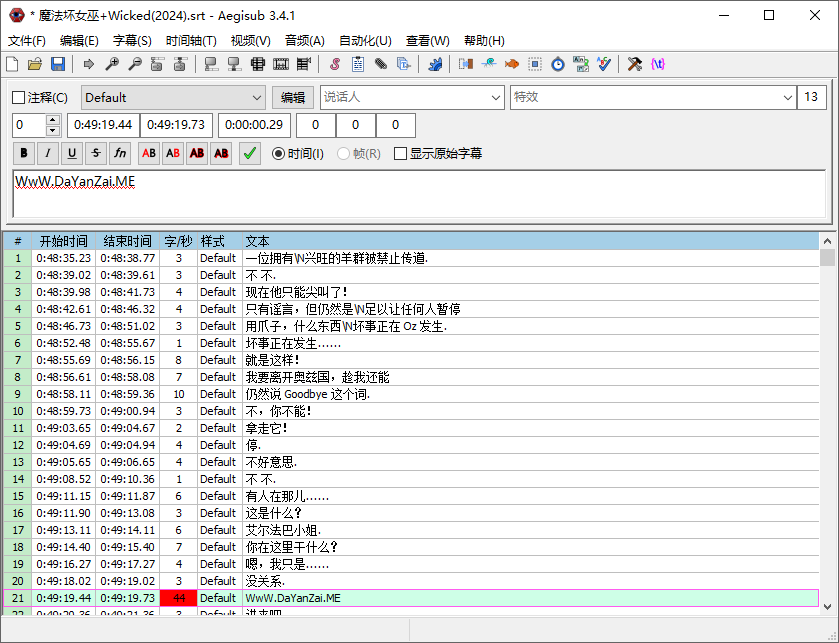
软件特点
1. 强大的脚本编辑器
Aegisub 内置了一个高度可定制化的脚本编辑器,支持 ASS(Advanced SubStation Alpha)和 SRT 字幕格式。用户可以通过直观的界面轻松编写复杂的字幕样式,包括字体、颜色、阴影、轮廓等效果。此外,还支持嵌入式命令,允许对每个字幕行进行精细控制。
2. 视频预览与音频同步
为了确保字幕准确地匹配视频内容,Aegisub 提供了内置的视频播放器和音频波形视图。用户可以在编辑时实时预览字幕显示效果,并通过拖拽时间轴或使用快捷键快速调整字幕出现的时间点。这种即时反馈机制大大提高了工作效率。
3. 自动化与宏命令
Aegisub 支持通过 Lua 脚本来扩展其功能,这意味着您可以编写或下载现成的宏命令来自动化重复性任务。例如,批量修改字幕样式、生成卡拉OK效果、自动分割长句等。对于需要处理大量文件或追求高效工作的用户来说,这是一个非常实用的功能。
4. 协作与多语言支持
Aegisub 支持多人协作项目,允许团队成员同时在线工作于同一个字幕文件的不同部分。而且,由于软件本身支持多种语言界面,因此非常适合国际化团队合作。另外,它也兼容各种编码标准,确保不同地区的用户都能顺利读取和保存字幕文件。
5. 插件系统
除了核心功能外,Aegisub 还拥有一个活跃的插件社区。开发者可以为 Aegisub 创建额外的插件,以添加新特性或改进现有功能。这些插件覆盖了从简单工具到复杂过滤器的各种应用,进一步增强了软件的功能性和灵活性。
更新日志
v3.5.1
Windows
- Report Windows 11 correctly to the update checker.
macOS
- Fix a crash on startup on macOS 13 and other macOS releases with an older system libc++.
- Allow Automation scripts to load native modules that aren’t signed by Aegisub’s developer again.
- Report macOS 11 and later correctly to the update checker.
Automation
- Fix controls in script dialogs coming out smaller than intended with newer wxWidgets versions.
- Make
include()andrequire()report the actual syntax error for broken Lua and MoonScript files, rather than the module name or “attempt to call a nil value”. - Fix runtime errors in scripts loaded with
include()crashing Aegisub on some platforms. - Fix detection of files starting with a UTF-8 BOM on platforms where
charis unsigned. - Add
aegisub.version, which lets scripts check the version of Aegisub they’re running in.
Bugfixes
- Fix a crash when the video display keeps failing to render, e.g. due to a persistent OpenGL error.
- Make changing underline in the font dialog set
\urather than toggling italics. - Fix the
LayoutResYcomputed when resampling a script that has aLayoutReswhile adding or removing top or bottom borders.
Improvements
- Let the video, audio, keyframe, and timecode file dialogs start in the current script’s folder when the last such file was opened from its script’s folder.
- Show each track’s language and title in the track selection dialog.
- List only the file types the active audio and video providers support in the file dialogs’ filters.
Translations
- Update the Korean translation.
Development
- Fix building with LuaJIT’s external unwinding and with some GCC versions.
- Build the bundled FFmpeg without unused components.