Puresys纯净系统-软件下载
介绍
官方网站:https://github.com/mpc-qt/mpc-qt
MPC-QT 是一款基于Qt框架开发的轻量级多媒体播放器,旨在为用户提供流畅的音频和视频播放体验。它继承了 Media Player Classic 的经典设计,同时融入了现代化的功能和界面,支持多种格式的媒体文件。MPC-QT 专注于简洁性和高效性,确保用户可以轻松播放各种类型的音视频内容,而不会受到复杂的设置或过多的功能干扰。
软件截图
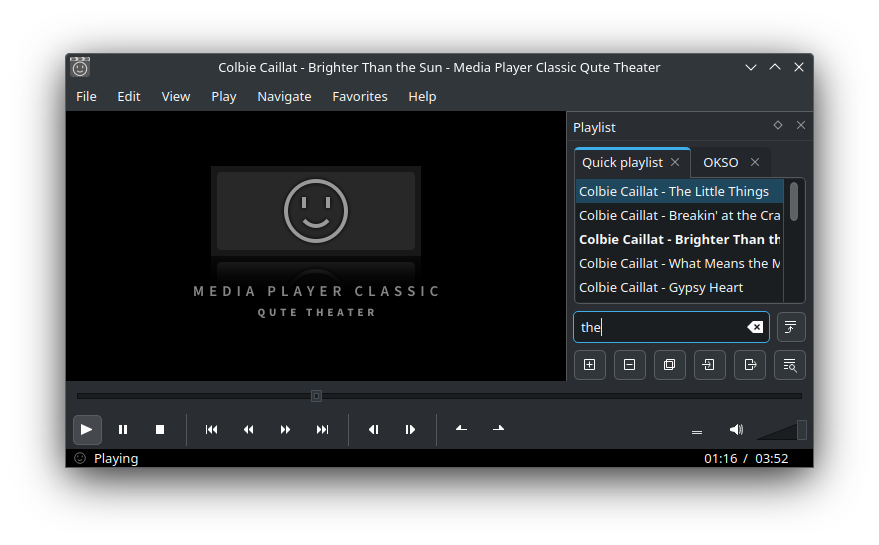
软件特点
简洁界面:提供直观易用的操作界面,用户可以快速找到所需功能,无需复杂的培训或技术支持。
高效性能:优化的播放引擎和低资源占用使得 MPC-QT 运行流畅,即使在较老的计算机上也能保持良好的播放效果。
现代化设计:基于 Qt 框架开发,界面美观且响应迅速,提供了现代化的用户体验。
多功能集成:集成了播放、截图、字幕加载和音频调节等多种功能,满足用户在不同场景下的需求。
跨平台支持:不仅适用于 Windows 操作系统,还支持 Linux 和 macOS,确保用户在不同平台上都能享受一致的播放体验。
软件功能
播放多种格式:支持广泛的音频和视频格式,包括 MP4、AVI、MKV、MP3、AAC 等,确保用户可以播放几乎所有常见的媒体文件。
内置解码器:集成了多种解码器,无需额外安装插件即可播放大多数媒体文件,简化了用户的使用流程。
播放列表管理:支持创建和管理播放列表,用户可以轻松添加、删除和排序文件,方便连续播放多个媒体文件。
截图功能:允许用户在播放过程中随时截取当前画面,保存为图像文件,方便分享和记录精彩瞬间。
字幕支持:支持多种字幕格式,用户可以加载外部字幕文件,调整字幕位置和样式,提升观看体验。
音频调节:提供均衡器和音频效果设置,用户可以根据个人喜好调整音效,获得更好的听觉享受。
更新日志
v26.07
Key highlights:
Improved performances for: opening a video, changing video, showing the seek bar and the video preview.
The control buttons are smaller to leave more space for the content.
The options are simplified and we've added a search box to filter them.
The Wayland mode is now enabled by default for new installations, it works with the AppImage and is improved.
Dark mode now works on GNOME-based desktops.
Many other features and improvements could be listed here, many thanks to the new contributors!
Features
Add move subtitles vertically feature by @tbertels in #687
Support changing status time format by click, add remaining and percentage modes by @tbertels in #794 #817
Add support for AVIF screenshots, prettify JPEG encoding settings and add avif to accepted file extensions by @tbertels in #800
settingswindow: Add "Mono" audio channel layout preset by @tbertels in #836
Add "Use dark colors" option by @tbertels in #857
Add auto deinterlacing by @tbertels in #871
Add support to enqueue files from file manager by @tbertels in #872 #904 #930
drawnslider: Jump to start of current chapter on middle-click in progress bar by @Thoxy67 in #941 #976
settings: add Replay Gain controls to Audio renderer page by @Thoxy67 in #944
widgets: add status time hover tooltip and double-click goto by @Thoxy67 & @tbertels in #945 #968 #971
Show hardware decoding state in a main window playback status tooltip by @tbertels in #965
Support adjusting audio delay and simplify setting audio, video and subtitles tracks menus by @tbertels in #966
Add a feature to loop over to first/last file when using 'use next/prev file in folder when only one file in playlist' by @wufik0 in #972
Improvements
Trigger Play from stopped state when clicking on mpvWidget by @tbertels in #683 #845
mainwindow: Make Play / Pause action trigger Play button by @tbertels in #684
manager: Remove file title from tracks titles by @tbertels in #686
Simplify title bar setting by @tbertels in #709
playlistwindow: select tab on right click, move Clear command to tab menu and add Rename command by @tbertels in #738
settingswindow: Let pipewire set its own buffer and reduce pulse buffer by @tbertels in #744
Improve Playlist window and add "Remove Selected Item" command to Playlist menu by @tbertels in #749
mainwindow: Remember "Disable aspect ratio" menu toggle by @tbertels in #753
actioneditor: Ask confirmation if new keybind will overwrite existing one by @tbertels in #774
Use Wayland mode by default, enable the option only on Wayland, differentiate between X11 and XWayland by @tbertels in #775 #864
mainwindow: Only show Step and subtitles buttons for videos by @tbertels in #786 #808
Use latest Qt LTS for the CI and the AppImage by @tbertels in #788
ci: Add Wayland mode support to AppImage by @tbertels in #790
Add support for transparency to all color settings by @tbertels in #795
actioneditor: Add descriptive names for Previous & Next (Skip Backward & Forward) by @tbertels in #798
Improve "Interface" settings page by @tbertels in #807
drawnslider: Make seek bar, volume handles border and chapters brighter for dark themes by @tbertels in #809
Show message when ambiguous shortcut is used by @tbertels in #812
Improve language override by @tbertels in #813 #827 #958
Windows: Don't create start menu folder and show version in Windows Uninstall app by @tbertels in #833
Add Bink Video format to supported file types by @tbertels in #834
Reduce the size of buttons by @tbertels in #839 #954
Set default Volume Increase/Decrease shortcuts to Up/Down by @tbertels in #847
Simplify subtitles settings and remove redundant options by @tbertels in #849
Show screen make and model in Fullscreen settings screen selector by @tbertels in #859
mainwindow: Only show app name in window title when no file is loaded by @tbertels in #862
mainwindow: Move SubtitlesDelay actions to submenu by @tbertels in #868
manager: Show track language script when non standard by @tbertels in #874
settingswindow: Use default mpv OSD font size by @tbertels in #879
Make "Previous" seek to beginning of current chapter if not beyond 5 seconds by @tbertels in #883 #925
settingswindow: Use mpv defaults for enabled hardware codecs; add AV1 and VP8 by @tbertels in #888 #889
Use custom slider widget for audio balance and color controls settings by @tbertels in #893
Bring window to front when opening a video for immediate playback by @tbertels in #895
Display buffering state and progress in status bar on buffer underrun by @tbertels in #898
Add m4b (MPEG-4 Audiobook) to supported file extensions by @tbertels in #902
videopreview: Request yt-dlp formats meeting minimum preview height by @tbertels in #914
Enable subtitles / unmute when user selects a subtitles / audio track by @tbertels in #926 #939
Rename "Library" to "Playlists Backup" by @tbertels in #934
Don't play first frame when resuming position by @tbertels in #940 #948
drawnslider: cache background image, only redraw on state change by @Thoxy67 in #942
drawnstatus: skip repaint when displayed time hasn't changed by @Thoxy67 in #943
settingswindow: add searchable settings input by @Thoxy67 in #946
Speed up video transitions and prevent previous-frame flashing by @tbertels in #957
Migrate video horizontal flip to filterlist and make it a toggle by @tbertels in #959
mainwindow: Add 16:9 Aspect ratio command by @tbertels in #960
playlistwindow: Remove Close Tab button at the bottom by @tbertels in #962
playlistwindow: Remove "Save As..." command from context menu by @tbertels in #978
Speed up video preview generation by @tbertels in #979
settingswindow: Default auto window size to video size by @tbertels in #980
videopreview: Add fallback formats and QuickJS support for yt-dlp by @tbertels in #986
main: Switch to matching playlist when opening file from recents by @tbertels in #987
Don't draw logo when launched with a file by @tbertels in #991
Bug fixes
main: Save only the path part of screenshot location by @tbertels in #756
Don't percent-encode filename or path for thumbnails by @tbertels in #763
mainwindow: Don't add subtitles "Move" menu to root of Play menu by @tbertels in #767
mainwindow: Uncheck "Repeat" menu action when disabling loop by @tbertels in #768
Fix restoring audio and video tracks from Recents by @tbertels in #769 #781
main: Set a shorter stale time for the lock file by @tbertels in #772
Change key shortcut for "Move File to Recycle Bin" and rename it to "Remove File...