Puresys纯净系统-软件下载
介绍
Open Server Panel 是一款无需安装、即开即用的本地Web服务器软件包,专为 Windows 系统打造。它集成了Apache、Nginx、PHP、MySQL/MariaDB/PostgreSQL等多种核心服务组件,并通过一个简洁直观的控制面板进行统一管理。无论是开发调试网站、测试 PHP 项目,还是搭建本地 API 服务或学习 Web 技术,OSPanel 都能为你提供一个高效、稳定的运行环境。
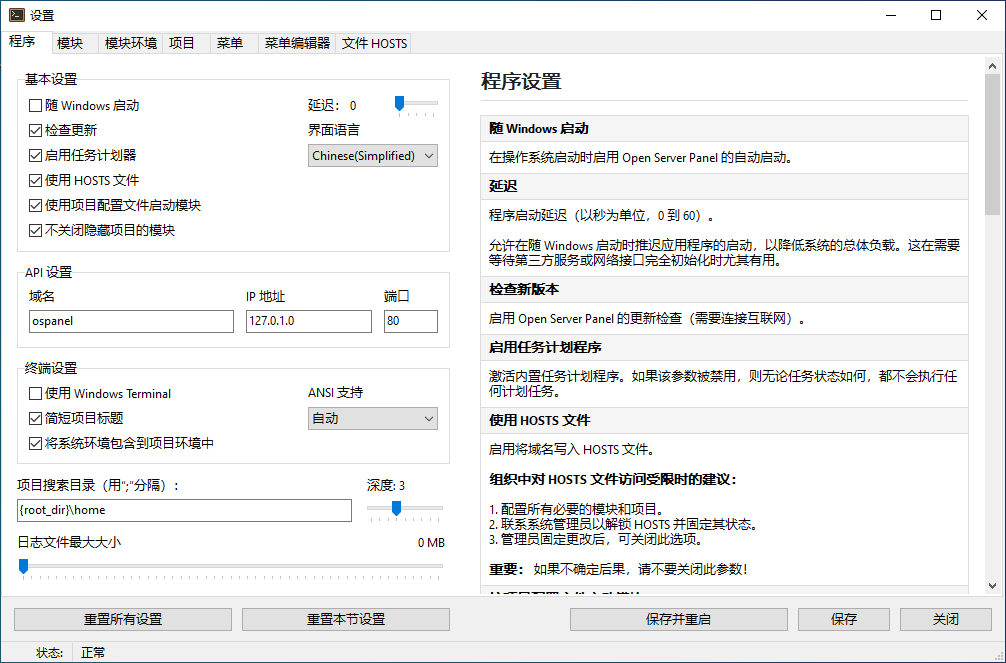
软件截图
软件特点
开箱即用,免配置
无需繁琐的安装流程,解压即可运行。支持便携模式,可直接从U盘或任意文件夹启动,非常适合多设备开发者或系统重装后快速恢复环境。
全面支持现代Web技术
- HTTP/2 加速网页加载
- Brotli压缩 提升传输效率
- IPv6与SSL 原生支持,无需手动配置
- 国际化域名(IDN) 支持,轻松创建本地多语言站点
多版本PHP自由切换
内置从 PHP 7.2 到 PHP 8.4 的全系列版本,支持为每个虚拟主机独立设置PHP版本,满足不同项目的兼容性需求。同时提供超过 115个PHP扩展,涵盖开发中常用的各种功能模块。
灵活的模块化架构
支持多种服务器与数据库并行运行:
- Web服务器:Apache(+13模块)、Nginx(+19模块,支持反向代理)
- 数据库系统:MySQL、MariaDB、PostgreSQL、MongoDB、Redis、Memcached
- 开发辅助工具:Mailpit / SMTP4dev(本地邮件测试)、RabbitMQ(消息队列)、Blackfire(PHP性能分析)
你甚至可以同时启用所有模块,实现复杂的微服务本地模拟。
强大的域名与环境管理
- 轻松创建本地虚拟主机(如 project.test)
- 支持国际域名和域名别名
- 为每个站点单独配置IP、端口、PHP版本、SSL证书等
- 一键生成配置文件,快速部署项目
高效的开发体验
- 内置命令行工具,一键进入各服务的Shell环境(如MySQL CLI、PHP CLI)
- 支持通过控制台命令快速切换当前开发环境
- 可创建模块配置自定义配置集,便于团队协作或项目迁移
- 完整的进程监控与崩溃自动恢复机制,确保服务稳定运行
更新日志
Open Server Panel 6.5.1
🔨 Changes
- Directory icons: The use of custom folder icons is now prohibited. The
Rattribute is now removed recursively from the program directory and project directories to prevent PHP runtime errors. - Web server configuration: Web server configuration can now only be extended; full replacement is no longer supported.
- Templates: Host configuration templates (
host_static,host_php,host_proxy), as well as custom host configuration files, are now processed by the template variable parser, just like all other configuration files. - Default limits: Default memory and timeout limits have been revised for PHP, Apache, Caddy, and Nginx.
- Configuration snippets: Configuration snippets for Apache, Caddy, and Nginx have been reworked.
- Component updates: All components of the software suite have been updated to their latest versions.
🐞 Fixes
- Host configs: Fixed an issue that caused custom host configuration files not to work.
- Settings: Fixed an issue where the time zone value could be displayed incorrectly in the settings window.
- Default hosts: Fixed issues that caused some default hosts to work incorrectly even after configuration.