Puresys纯净系统-软件下载
介绍
官方网站:https://compresso.codeforreal.com/
还在为视频体积过大分享困难发愁?还在担心在线压缩工具泄露隐私、加水印?CompressO 的出现完美解决了这些痛点 —— 这款跨平台的桌面视频压缩软件,以100% 免费开源、纯本地运行、功能全面为核心优势,兼顾压缩效率与画质保留,成为个人用户、自媒体创作者的实用工具,支持 Windows、macOS、Linux 全系统,让视频处理变得简单又安心。
CompressO 最打动用户的一点,是将隐私保护做到了极致。与需要上传文件到云端的在线压缩服务不同,它的所有压缩与处理操作都在本地设备完成,视频文件从未离开你的电脑,从根源上避免了数据泄露、内容盗用的风险。
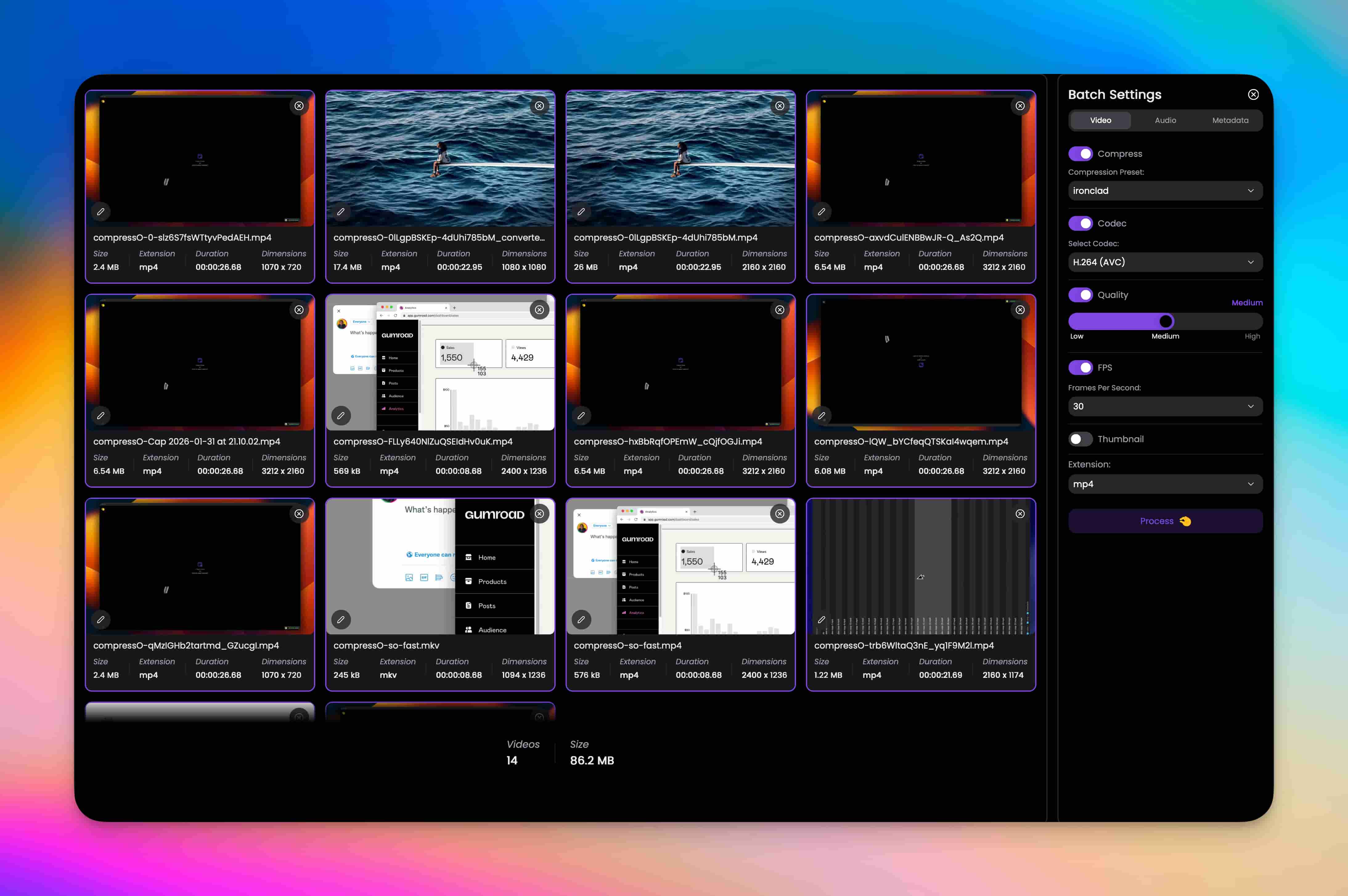
软件截图
软件特点
FFmpeg 驱动,秒级处理不损画质
作为一款专业的视频压缩工具,CompressO 的性能表现同样亮眼。它基于最新版 FFmpeg 引擎开发,融合行业领先的智能压缩算法,实现了速度与画质的双重平衡:不仅能在几秒内完成视频压缩,大幅缩减文件体积(实测可实现 93.91% 的压缩率,229MB 视频可压缩至 14MB),还能通过先进的算法优化,最大程度保留视频原始视觉效果,避免出现画面模糊、卡顿等问题,压缩后的视频无论是分享到社交平台,还是本地存储,都能满足使用需求。
操作上更是极简,支持拖拽文件 / 文件夹、剪贴板粘贴、右键直接打开三种方式添加视频,无需任何专业的视频处理知识,选择预设后一键压缩,新手也能快速上手,真正做到 “零学习成本”。
不止压缩,更是一站式视频处理工具箱
CompressO 远不止是一款简单的压缩软件,它集成了丰富的视频编辑、参数调节功能,兼顾普通用户的便捷需求和专业用户的精细调控,是一款真正的一站式视频处理工具。
基础压缩与格式适配
支持 MP4、MOV、AVI 等所有主流视频格式,可自由选择输出格式,还能自定义压缩预设、编码格式(如 H.264/AVC)、画质等级(低 / 中 / 高),并提供 480p、720p、1080p、2K、4K 等分辨率一键切换,轻松平衡文件大小与播放画质,压缩前还能预览效果,避免踩坑。
实用视频编辑功能
压缩前可对视频进行精细化处理:支持裁剪、分割、旋转、翻转、缩放,轻松截取视频精华部分,调整视频画面角度;还能自定义帧率(FPS),满足不同场景的播放需求,让视频处理更灵活。
音频与元数据调控
针对视频音频,可自由调整编码格式、音量、声道布局,支持左右声道互换、自定义音频比特率,还能选择指定音轨,解决视频音频过大、音质不佳等问题;同时支持查看视频完整元数据,编辑标题、作者、版权、年份等信息,还能自定义视频缩略图,让视频管理更规范。
批量处理与系统适配
搭载智能队列管理功能,支持多视频批量压缩,还能直接粘贴视频文件 / 文件夹路径实现快速批量处理,大幅提升多视频处理效率;深度适配系统,可在文件管理器中右键选择 “用 CompressO 打开”,压缩后还能直接将视频复制到剪贴板,方便快速分享,细节拉满。
永久免费,社区驱动持续进化
CompressO 采用 MIT 开源协议,是完全开源的软件项目,代码托管于 GitHub,所有人都可查看、审计代码,也能参与项目贡献、二次开发,甚至根据自身需求 fork 定制专属版本,开发过程全程透明,无任何隐藏代码和后门。
项目由 Code For Real 团队开发维护,以社区驱动的方式持续更新优化,不断迭代新功能、修复问题,且无任何付费版本、隐藏收费和高级会员,承诺永久免费,无论是个人日常使用,还是小型团队、工作室的轻量视频处理,都能无压力使用。
在当下注重隐私保护、追求高效便捷的时代,CompressO 凭借免费开源、本地运行、功能全面的核心优势,成为视频压缩工具中的 “清流”。它摒弃了所有花里胡哨的附加条件,将核心的压缩、处理功能做到极致,既解决了用户的实际需求,又让使用过程安心、省心。如果你厌倦了在线压缩的繁琐与隐私风险,想要一款轻量、高效、免费的本地视频处理工具,CompressO 绝对值得一试。
更新日志
v3.0.0
Features:
- New Brand Identity: Updated logo and app icon across all platforms.
- Image Compression Support: Comprehensive image compression for JPEG, PNG, WebP, and GIF formats with quality controls and optimization options.
- Image Transformations: Full transformation support for images including crop, rotate, flip, and dimension adjustments.
- SVG Conversion: Convert SVG files to PNG, JPEG, or WebP formats with advanced settings for raster to SVG conversion.
- Convert to SVG: Convert any raster images like png, jpeg, webp, etc. to a svg image. A real vector image.
- Video to GIF Conversion: Convert videos to animated GIFs with customizable quality and FPS settings.
- GIF Compression: Compress animated GIFs while maintaining quality and reducing file size.
- Cross-Container Image Conversion: Convert between different image formats (JPEG, PNG, WebP, SVG) seamlessly.
- Output Comparison Slider: Compare original and compressed images/videos with an interactive before/after slider.
- In-App Updater: Built-in updater to notify and download new releases automatically within the application.
- Video Speed Control: Adjust video playback speed for faster preview and review.
- Image Metadata Preservation: Preserve EXIF and other metadata when compressing images.
- Full Image Information View: View detailed information about image files including dimensions, format, EXIF metadata, etc.
Enhancements:
- Linux Video Playback: Implemented local axum server to serve video assets on Linux, enabling video playback that was previously unsupported on WebGTK.
- Improved Compression Settings: Enhanced compression settings UI with better controls and options for both video and image compression.
- Better Output Stats Display: Improved the display of compression statistics showing before/after file sizes and savings percentage.
- Advanced SVG Support: Added support for converting large SVG files to PNG for thumbnail rendering and better compatibility.
- Piped Process Support: Refactored media processing to support piped commands, enabling more complex transformation workflows.
- Central Process Executor: Implemented central process executor using builder pattern for better process management and error handling.
- Subtitle Handling: Improved subtitle embedding with better preservation of language and title metadata.
- Metadata Stripping: Enhanced metadata stripping functionality with more granular controls.
- Batch Compression: Extended batch compression settings to fully support image compression alongside video compression.
Bug Fixes:
- Fixed dimension calculation issue during image crop operations.
- Fixed output path display after media is saved.
- Fixed FPS not being properly applied during GIF conversion.
- Fixed subtitle embedding issues for multiple container formats.