Puresys纯净系统-软件下载
介绍
官方网站:https://github.com/aleksey-hoffman/sigma-file-manager
Sigma File Manager 是一款免费、开源、快速发展的现代文件管理器(资源管理器/浏览器)应用程序,适用于Windows和Linux。软件主要功能包含智能全球搜索、高级无线文件共享、高级文件下载器、文件保护等等。
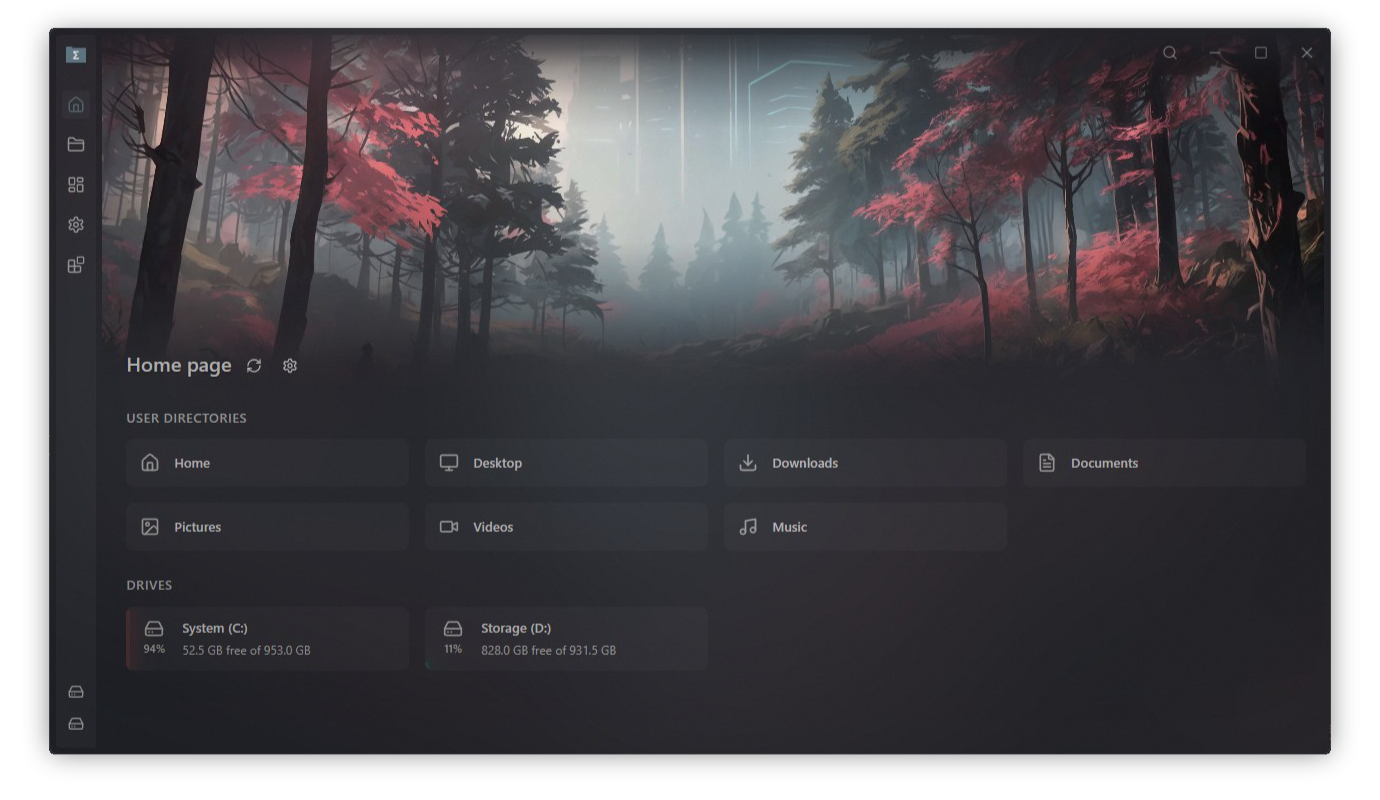
软件截图
软件特点
- 智能全球搜索:几秒钟内就能找到文件和文件夹(搜索整个硬盘大约2秒)。其拼写纠正系统处理拼写错误、大小写错误、词序错误、缺词、缺失符号和缺失的文件扩展名。
1TB - 标签:保持多个目录开放,并能即时切换。
- 分屏视图:任何标签页都可以分成两个面板,你可以独立导航,文件也可以轻松地在它们之间传输。
- 扩展与市场:从内置市场或本地文件夹安装扩展。扩展可以添加命令、页面、快捷方式、设置等功能。
- 默认文件管理器:在Windows上,Sigma可以替代文件资源管理器来处理大多数日常文件操作。
- 局域网文件共享:通过本地网络分享或流式传输文件和文件夹,支持浏览器访问、二维码和FTP支持。
- 网络位置(Alpha阶段):连接到远程地点,如SSHFS、NFS、SMB和CIFS。
- 地址栏:用键盘导航,自动补全路径,并快速跳转到父文件夹。
- 物品筛选:窄大文件夹,带有球状图案和属性过滤器,包含大小、日期、MIME类型等。
- 智能拖拽:移动或复制本地文件更舒适,网页投放处理也更顺畅。
- 快捷键与命令面板:大多数操作都支持键盘操作,配备全局快捷键和快速的应用程序及扩展命令面板。
- 主页横幅与视觉效果:通过自定义图片、视频、内置艺术作品、透明度、混合模式及其他风格控件来个性化界面。
- 仪表盘和快速访问:访问收藏、标记文件、访问次数最多地点以及一个中心区域的历史数据。
- 标签:用标签整理你的文件和文件夹。
- 压缩压缩包:将文件压缩到归档中,并在不离开应用的情况下解压。
.zip - 应用内更新:直接通过更新通知下载和安装更新。
- 快速视图:即时预览图片、视频、音频、PDF和文本文件,无需打开外部应用即可切换文件。
Space - WSL驱动:在Windows上,可以直接在导航器中浏览检测到的WSL发行版。
- 本地化:该应用为所有最常用语言提供了翻译。
- 还有更多。扩展还提供诸如视频下载(支持1000+网站,包括YouTube、Twitch等)、媒体转换器、图像尺寸优化器等额外功能。
更新日志
New Features
Extensions System
Full extension system with open marketplace.
Marketplace: browse, install, and manage extensions from the marketplace;
Local installation: you can install extensions from local folder;
Command palette: new way to activate app and extension commands;
Capabilities: extensions can register local and global shortcuts, context menu items, settings, whole pages, and commands;
Versioning: you can install different versions of extensions and enable auto update;
Localization: extensions can provide translations for different langauges;
Binary management: extensions can use binaries (ffmpeg, deno, node, yt-dlp, 7z, and any other existing binary);
Sandboxed execution: extensions run in isolated ESM sandboxes with granular permissions;
Default file manager
You can now make SFM the default file manager on Windows (Settings > Experimental). When this setting is enabled, most system file actions will be routed to SFM:
File Explorer app icon;
Ctrl+E shortcut;
Reveal file in folder;
Show downloads (when you download a file in browser);
Terminal commands: "start {path}", "code {path}", etc.
And more;
Native system views like "Recycle Bin", "Control panel", and such deeply integrated programs are delegated back to native File Explorer.
LAN Sharing
Share and stream files and directories over your local network directly from the app.
Access LAN sharing from the toolbar button in the navigator or from the context menu on any file or directory. When a share is active, a QR code and shareable URLs are displayed. Two modes are available:
Stream: stream files and directories to any device on your network via a web browser;
FTP: share files over FTP for direct access from other apps. You can both download and upload files from and to the computer from other device;
Quick Access Menu
The "Dashboard" button in the sidebar now acts as a quick access menu. Hovering over it opens a panel showing your Favorites and Tagged items.
All items in the panel are real directory entries - you can drag and drop items in and out, open context menus with right click, and perform any standard file operations.
Can be disabled in Settings > UI appearance > Open quick access panel on hover.
Zip Archives
Compress and extract zip archives directly from the file browser actions menu:
Extract: extract a .zip file to the current directory or to a named folder;
Compress: compress selected files and directories into a .zip archive;
WSL Drives Detection
On Windows, the app now automatically detects installed WSL distributions and displays their drives in the navigator, allowing you to browse WSL file systems natively.
Tag Editing
You can now edit tag names and colors. Open the tag selector on any file or directory to rename tags, change their color, or delete them.
In-App Updates
You can now download and install updates directly from the update notification without leaving the app.
Copy Path
Added "Copy path" option to the file and directory context menu.
Close Duplicate Tabs
Added the ability to close duplicate tabs from the tab bar, removing all tabs that point to the same directory.
Home & Dashboard Context Menus
Items on the home page and dashboard now have full context menus, matching the functionality available in the navigator.
New Settings
Show home media banner: show or hide the home page media banner (Settings > UI appearance > Home page media banner);
Tooltip delay: configure the delay before tooltips appear (Settings > UI appearance > Tooltips);
Relative time: display recent timestamps in relative format, e.g. "5 min ago" (Settings > General > Date / time);
Date and time format: configure month format, regional format, 12-hour clock, seconds, and milliseconds (Settings > General > Date / time);
Dialog backdrop blur: set the blur intensity for dialog backdrops (Settings > UI appearance > Style settings);
Brightness and contrast filters: adjust brightness and contrast style filters for the app UI (Settings > UI appearance > Style settings);
Overlay media brightness: adjust brightness of the visual effects overlay media (Settings > UI appearance > Visual effects);
Visual Effects Mix Blend Mode: adjust mix blend mode for visual effects, letting you choose how background media blends with the app UI (Settings > UI appearance > Visual effects);
Pause background video: pause the home banner and background video when the app is idle or minimized (Settings > UI appearance > Visual effects);
Default file manager: set Sigma File Manager as the default file explorer on Windows (Settings > Experimental);
Launch on system login: automatically launch the app when you log into your system (Settings > General > Startup behavior);
New Shortcuts
Copy current directory path (Ctrl+Shift+C): copy the current directory path to clipboard;
Reload current directory (F5): refresh the navigator file list;
Zoom in / out (Ctrl+= / Ctrl+-): increase or decrease UI zoom;
Fullscreen (F11): toggle full screen mode;
New Languages
Hindi;
Urdu;
UX Improvements
Quick View Enhancements
Media navigation: navigate between files in the current directory without closing quick view;
Text file preview: improved text file preview with proper encoding detection, inline editing, and parsed markdown rendering;
Quick Search Enhancements
All properties: search by any file property - name, size, item count, modified, created, accessed, path, or MIME type (e.g. modified: today, mime: image);
Size ranges: filter by size using comparisons and ranges (e.g. size: >=2mb, size: 1mb..10mb);
File Operations
Conflict resolution safety: improved file safety within the conflict resolution modal to prevent accidental data loss;
Single-use paste: copied items can only be pasted once, preventing accidental duplicate pastes;
Copy text: allow copying UI text with Ctrl+C when no files are selected;
Visual Effects
Background manager: added background manager to the settings page for centralized background customization;
Background effects reset: added a reset button to background effects settings;
Other
App size reduction: reduced app bundle size from 32 MB to 12 MB;
Global search: display a "show settings" button in empty state and increased default search depth;
Windows shortcuts: .lnk files now open their target in the navigator instead of launching externally;
Dashboard: improved tagged section layout;
Address bar context menu: added context menu to address bar items;
Navigator context menu: show context menu when clicking empty area in the navigator;
Open in new tab: open directories in a new tab with middle mouse click;
Tab scroll: scroll newly added tabs into view automatically;
Menu focus: menus no longer return focus to their trigger button when closed with a click outside;
Close search: close global search with Escape;
Faster launch: slightly improved app launch speed by preloading settings in Rust;
User directories: added ability to add and remove user directories on the home page;
List limits: decreased limits for frequent and history list entries to improve performance;
UI Improvements
Toolbar icons: unified toolbar icon colors across the app;
Card animations: added stagger and fade-in effects to cards;
Light theme: improved light theme colors and contrast;
Launch stability: improved visual stability during app launch to reduce flickering;
Notifications: improved notification design for better consistency;
Tab auto-scroll: auto scroll the selected tab into view when opening the navigator page;
Root path labels: normalized root path labels across tabs and info panel;
Translations: improved translations across the app;
Bug Fixes
Fixed copying or moving many items freezing the UI; added file operation progress to the status center;
Fixed deleting many items freezing the UI; added deletion progress to the status center;
Fixed context menu in grid layout not opening for the current directory when another item already has a menu open;
Fixed info panel not displaying all information for the current directory;
Fixed app shortcuts being registered on the quick view window instead of only the main window;
Fixed files dragged from web browsers not being handled;
Fixed filenames from external URL drops not keeping valid segments;
Fixed home banner being draggable;
Fixed system icon cache not being keyed by file path, causing incorrect icons;
Fixed inaccessible Windows root entries showing in the navigator;
Fixed custom shortcuts being unidentified on some keyboard layouts;
Fixed SSHFS connections on Linux;
Fixed address bar creating duplicate history entries on breadcrumb click;
Fixed global search results not responding to keyboard navigation;
Fixed global search results not opening on click;
Fixed global search status not syn...