 Puresys纯净系统-软件下载
介绍
官方网站:https://github.com/itsfatduck/optimizerDuck
optimizerDuck 是一款免费开源的 Windows 优化工具,主打性能提升、隐私保护与简洁易用。
软件截图
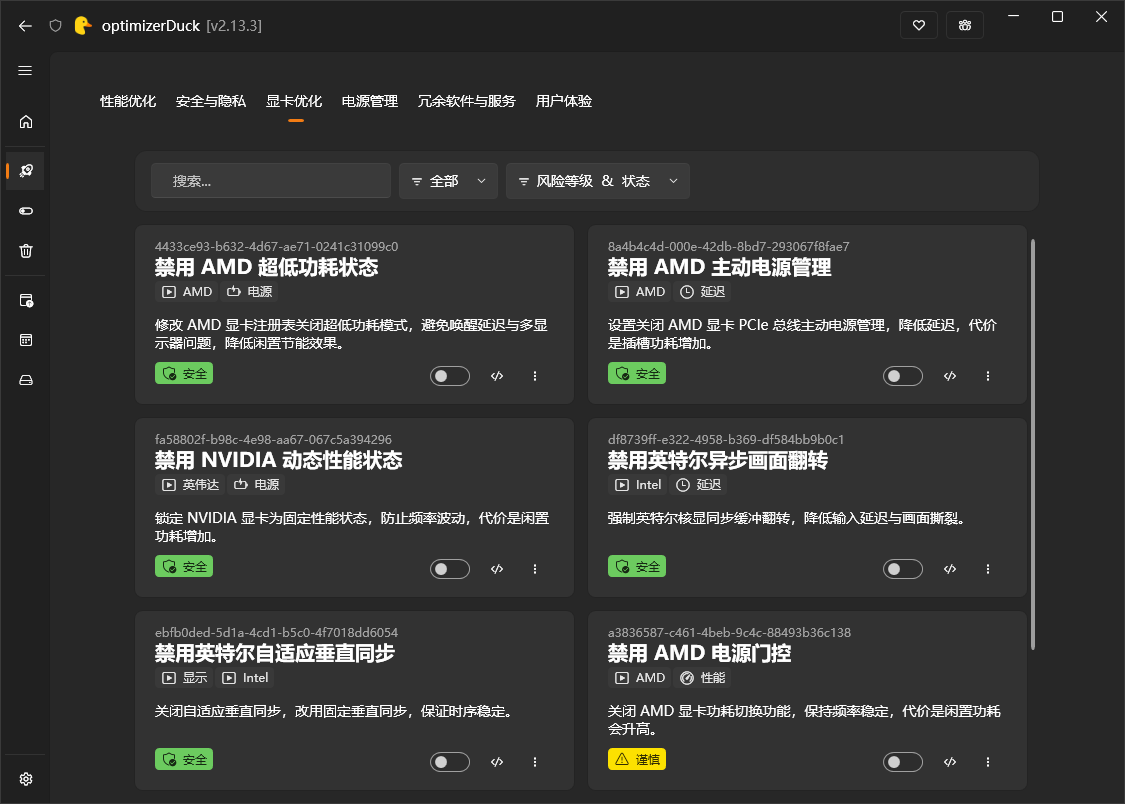
软件特点
内置 6 大分类、超过 35 项系统优化,附带多款实用系统工具; 所有优化均标注风险等级,支持一键还原更改。
| 功能模块 | 作用说明 | |
|---|---|---|
| 🚀 | 性能与电源优化 | 提升系统运行速度、禁用冗余服务、调校电源配置 |
| 🛡️ | 隐私安全防护 | 关闭遥测数据、小娜、Copilot、系统广告与行为追踪,夺回个人数据控制权 |
| 🎮 | 显卡专项调校 | 针对 AMD、NVIDIA、Intel 显卡专属优化 |
| 🧩 | 系统功能开关 | 一键启用或关闭各类 Windows 原生功能 |
| 🧹 | 磁盘清理 | 清理临时文件、系统缓存、旧版 Windows 安装包,快速回收磁盘空间 |
| 🗑️ | 预装软件卸载 | 卸载系统自带冗余应用,附带风险等级提示,安全可控 |
| ⚡ | 启动项管理 | 管控开机自启应用,保留所需、禁用无用项 |
| 📋 | 计划任务管理 | 查看、手动运行、停止或删除 Windows 计划任务,全面掌控系统后台任务 |
| 💻 | 系统信息面板 | 一键查看 CPU、内存、显卡、存储、系统版本等硬件信息 |
| 🔄 | 优化一键还原 | 误优化无需重装,点击即可撤销任意更改 |
| 🎨 | 简洁美观界面 | 支持深色/浅色/高对比度主题,采用现代化流畅设计 |
| 🌐 | 多语言支持 | 英语、越南语、繁体中文、简体中文 |
| 🔒 | 纯离线运行 | 无遥测、无广告、无数据收集,所有操作均在本地完成 |
优化分类
内置六大优化类别,每项均配有详细说明与风险评级:
- 性能优化:服务主机调校、进程优先级、键盘响应、游戏专项优化
- 安全与隐私:关闭遥测、错误报告、小娜、Copilot、广告推送、位置追踪
- 显卡优化:适配 AMD、NVIDIA、Intel 全系显卡专属调校
- 电源管理:休眠开关、快速启动、USB 节能、自定义电源方案
- 冗余软件与服务:卸载预装应用、精细调校 200+ 项 Windows 系统服务
- 使用体验:资源管理器提速、视觉特效、菜单延迟等个性化微调
系统功能开关
不仅可以一键应用系统优化,还能可视化开关各类 Windows 隐藏功能, 无需翻找注册表、无需网上搜教程,所有选项直观易用。
- 桌面设置:显示/隐藏此电脑、回收站、网络、用户文件夹、控制面板;去除快捷方式小箭头
- 任务栏:图标居中、小组件、任务视图、右键结束任务、任务栏时钟显示秒数、关闭开始菜单必应搜索
- 外观:全局深色模式适配
- 资源管理器:显示文件扩展名、显示隐藏文件、剪贴板历史、紧凑布局、窗口吸附、文件复选框、经典右键菜单
- 游戏优化:游戏模式、Xbox 游戏栏、后台录制、鼠标加速度、全屏优化、GPU 硬件加速调度
- 系统设置:开机自动开启数字小键盘
内置工具
- 系统面板:实时硬件信息总览
- 启动项管理:管控开机自启程序,支持筛选、搜索、启用/禁用
- 计划任务:完整的系统计划任务管理能力
- 磁盘清理:一键扫描、勾选、清理垃圾文件,简单高效
- 预装软件卸载:按风险等级列出系统自带应用,筛选后安全卸载
安全保障
optimizerDuck 全程把安全放在首位。 我们深知修改系统配置存在风险,因此内置多重安全防护机制。
隐私相关承诺详见:隐私政策
- 自动备份:每一项修改都会在本地备份,可单独还原或整体恢复
- 一键还原:操作失误随时撤销,一键恢复原有配置
- 风险分级:每项优化标注 低/中/高 风险等级,提前评估影响
- 不强制优化:所有优化均由用户手动选择,默认不启用任何改动
- 建议创建还原点:应用优化前主动提示创建系统还原点,双层保障
更新日志
v2.27.6
New
Startup Manager gets much smarter, thanks to @loliri
Modern packaged apps (UWP / MSIX) are now detected, including Windows Store apps that register themselves to start with Windows. You can toggle them on or off, and their state stays in sync with Windows Settings. Icons are pulled from the package automatically, so every app still shows a recognizable logo.
32-bit apps are now scanned as well. Many older apps and game launchers register under the 32-bit view of the registry, so optimizerDuck now shows them in the same list and lets you manage them alongside everything else.
Real timestamps are now written when you toggle a startup item, matching what the native Windows Task Manager stores. You can tell exactly when a change was made.
Taskbar progress indicator
When a long optimization is running, the progress bar now appears directly on the optimizerDuck icon in your taskbar. You can keep working in other apps and still know how much time is left.
Bloatware safety dialog
Before removing any package whose name looks unusual or could be a system component, optimizerDuck now shows a clear confirmation dialog with the package name, publisher, version, and a risk badge, so you can make a safe choice and cancel the removal if something looks off.
Customizations, thanks to @loliri
Combine taskbar buttons is a new option that controls how Windows groups taskbar buttons when you have many windows open (Always, When full, Never). The same setting applies on every monitor, so the taskbar looks the same on each screen. Windows 11 for multi-monitor support.
Verbose Status shows a detailed step-by-step message during startup, shutdown, and logon. Useful when you want to find out why your PC boots slowly. Note: this only takes effect if DisableStatusMessages is not also set.
UTC hardware clock sets your motherboard clock to UTC, so the time does not jump back and forth if you dual-boot Windows and Linux.
Smart name resolution stops Windows from sending your DNS requests across every active network adapter.
DLSS on-screen indicator lets you choose whether the small NVIDIA DLSS watermark appears in your games. You can pick Off, Debug only, or All versions. The option is shown only if your PC has an NVIDIA graphics card.
Optimizations, thanks to @loliri
WebDAV file size limit raises the default WebDAV upload and download size from 50 MB to 4 GB, fixing the 0x800700DF error you can get when copying large files over a WebDAV drive. Requires the WebClient service to be running.
Windows Update pause limit raises the longest time you can pause Windows Updates, giving you more control over when they install. Be aware that pausing too long can leave your system without security patches.
Improvements
Source code viewer uses your installed version. Clicking "view source on GitHub" inside the app now opens the file at the exact release tag matching your installed version, instead of the development branch. You always see the code you are actually running.
Smoother app during long operations. optimizerDuck stays responsive while running long optimizations, disk cleanups, and configuration loads. No more freezes during heavy work.
Cleaner navigation and dialogs. Sidebar icons for Optimize, Startup Manager, and Scheduled Tasks have been refreshed. Spacing inside cards and detail popups has been tightened across the app.
Fixes
Revert system is now safer on partial failure. When you undo a tweak that has several steps, optimizerDuck now keeps the undo record if any step fails. You can retry without losing your saved state, and the record is only removed when every step succeeds. Thanks to @ether-btc.
Path safety check hardened. Strengthened the security check that loads revert files so it can no longer be tricked by unusual folder names. Thanks to @ether-btc.
"Open file location" made safer. When you open a startup program's file location, optimizerDuck now validates the path and blocks attempts to pass extra arguments. Thanks to @ether-btc.
Disk Cleanup no longer touches running .NET temp files. Fixed an inverted filter that could delete .NET temporary files while a .NET application was still using them, which previously could cause the running app to crash. Thanks to @ether-btc.
Bing Search toggle works correctly, thanks to @loliri. The Bing Search customization now reads and writes both registry keys and group policies, so the on-screen state always matches what Windows actually uses.
Taskbar alignment reads the actual default. On fresh Windows installs where the registry value is missing, the Customize setting now correctly reports Center (the Windows default) instead of showing a "Custom" or "Not set" placeholder.



这个能在win7上使用吗,我下载之后点击弹出扫描异常,打不开软件