Puresys纯净系统-软件下载
介绍
官方网站:https://github.com/SubtitleEdit/subtitleedit/releases/
Subtitle Edit是一款简单好用的视频字幕编辑制作软件,现在大家都会自己拍摄或者制作一些视频,字幕作为一个点睛之笔通常是少不了的,一个好的字幕编辑软件能够事半功倍,Subtitle Edit可以快速编辑制作字幕,可以通过多种方式轻松调整原有 的字幕,支持从头开始自己添加创建调整字幕行,可使用时间线/波形/频谱图等,或者是进行字幕翻译添加,界面非常简单直观,使用起来也很轻松。
软件截图
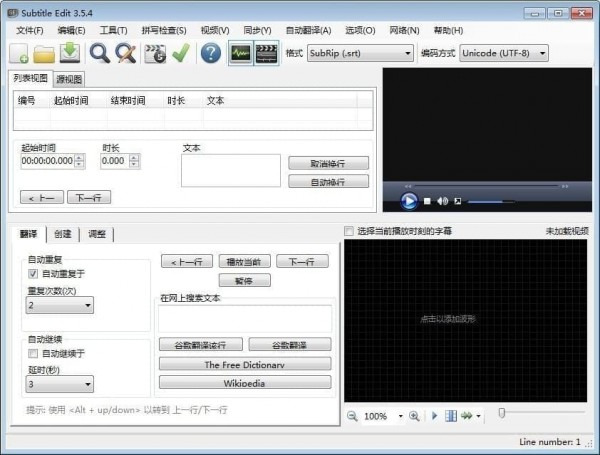
软件特点
1、创建/调整/同步/翻译字幕行
2、在SubRib,MicroDVD,高级子站Alpha,Sub Station Alpha,D-Cinema,SAMI,youtube sbv等等之间进行转换(200多种不同的格式!)
3、酷炫的音频可视化控制 – 可以显示波形和/或频谱图
4、视频播放器使用DirectShow,VLC媒体播放器或MPlayer
5、可视同步 /调整字幕(开始/结束位置和速度)
6、通过谷歌自动翻译翻译
7、翻录(解密)DVD的字幕
8、导入和OCR VobSub子/ idx二进制字幕
9、导入和OCR蓝光.sup文件 – bd sup读取基于来自BDSup2Sub的Java代码,由0xdeadbeef提供)
10、可以打开matroska文件中嵌入的字幕
11、可以打开嵌入在mp4 / mv4文件中的字幕(文本,隐藏式字幕,vobsub)
12、可以在divx / avi文件中打开/ OCR XSub字幕
13、可以打开/ OCR DVB字幕嵌入.ts(传输流)文件
14、可以打开/ OCR蓝光字幕嵌入.m2ts(传输流)文件
15、可以读写UTF-8和其他unicode文件和ANSI(支持PC上的所有语言/编码!)
16、同步:通过其他字幕显示较早/较晚的文本+点同步+同步
17、合并/拆分字幕
18、调整显示时间
19、修复常见错误向导
20、通过Open Office词典 / NHunspell进行拼写检查(提供许多词典)
21、删除听力受损的文本(HI)
22、重新编号
23、内置瑞典语到丹麦语的翻译(通过Multi Translator Online)
24、效果:打字机和卡拉OK
25、历史/撤消管理器(撤消= Ctrl + z,重做= Ctrl + y)
26、比较字幕
27、多次搜索和替换
28、使用名称字典更改套管
29、合并短线/分割长线
30、导出为PNG图像(+ bdn xml),Adobe Encore FAB图像脚本,VobSub,Blu-ray sup,EBU stl,PAC和纯文本
更新日志
v5.3.0 (14th of October 2026)
Subtitle Edit 5.3 collects the work of 26 betas and 4 release candidates.
A summary of the changes since v5.2.0 (full details in the pre-release entries below):
New features:
* Command palette (Ctrl+Shift+K)
* Import subtitles directly from DVD (IFO/VOB) with title picker, fast rip and exact cell timing
* Improve time codes (forced alignment) - re-time a roughly synced subtitle, with a speech-to-text check and waveform preview
* Remux video - video, multi-track audio (with mixing) and soft subtitles, also embedded CEA-608 captions
* Cut video transitions and fades, burn-in for selected lines, and 3D (half side-by-side / top-bottom) burn-in and image export
* Generate background music locally (ACE-Step)
* Compare: merge view, sync points, time tolerance and taking only text or timing per row
* Custom shortcut slots built from steps, AltGr modifier, per-plugin shortcuts and many new shortcuts
* Actor picker, "Set style..." quick pick, and "Shot in"/"Shot out" grid columns
* Reload the subtitle when it is changed outside Subtitle Edit, and "Frame numbers" time code mode
* Taskbar/Dock progress and prevent sleep for long jobs (speech to text, text to speech, burn-in, batch convert)
Video player and waveform:
* New FFmpeg video player with hardware decoding, audio track picker, real frame stepping and Linux sound
* Experimental mpv Metal video player on macOS, deinterlace setting, and customizable player controls
* Editor-style layout 14 with a track timeline, and layouts 12 and 13 (text box below the video)
* Experimental fast waveform renderer, "Show speech only" waveform, grid color and remembered zoom
* Waveform toolbar: initial text box, move-lines buttons, line breaks and wrapping
Speech to text:
* Crisp ASR: speaker detection (Sortformer), VAD choice (Silero, FireRedVAD, WebRTC, Whisper-VAD) and "Isolate speech"
* New models: Parakeet Ultra, Phonon-2, ReazonSpeech/Japanese Parakeet, Voxtral F16 and Index-Echo
* OpenAI-compatible API works with vLLM; retry of failed clips on selected lines
Text to speech:
* New engines: OpenAI-compatible TTS, ElevenLabs v4/v4 Turbo, KugelAudio and Supertonic-3
* Voice manager with transcripts, voice packs and copying voices between engines
* "Remove original speech", "Speak from current line" and "Play with speech"
* Optional Sidon cleaning of voice-clone reference audio
Auto-translate and AI:
* New engines: LM Studio advanced and API Route, model browsing, and new llama.cpp models (Index-Translate, TranslatePsy-AfriSLM)
* Translate in place, translate one file into several languages in batch convert, and a no-prompt shortcut
* 22 more languages for the AI engines, MyMemory without an API key, and line breaks kept for ChatGPT/Anthropic
* AI review: prompt templates and reference context
OCR:
* nOCR: much better accuracy, new Cyrillic database, "Optimize database", and a redesigned trainer
* Find and Replace in the OCR window, remembered pre-processing settings, and a per-language spell check dictionary
* Romanian and Croatian OCR fix lists; better word splitting
Subtitle formats:
* Read CEA-608/708 closed captions from .ts, .mkv, .mp4, .mxf, .vob, .mpg and .m2v
* New: EZTitles binary (.ezt), PSP UMD Video, HD-DVD sup, Cheetah Caption ASC, ELR Studio and more SE 4 formats opened again
* Transport stream, MP4 caption, CEA-708 and Blu-ray sup timing fixes; PAC code page detection and secondary code page
* ASSA draw: redesigned with layers, shape library, curve tools, SVG import and live preview
* ASSA styles: overwrite/keep both on import, reorder, font collector; Source view syntax highlighting
Batch convert and seconv:
* Batch convert: named presets, new functions and filters, multi-language translate, OCR language per file, and many format settings
* seconv: DVD sup and IMSC image outputs, openai-compatible and DeepL translate, nOCR optimize, and more SE 4 formats
Accessibility and UI:
* Screen reader names across settings and tool windows, F1 help in 145 more dialogs, and remembered dialog sizes/positions
* Settings show one category at a time with search and back/forward navigation; settings auto-backup
* macOS-standard default shortcuts and a new rounded app icon
Translations and engines:
* All language files synced with English
* Updated engines: Crisp ASR v0.8.43, whisper.cpp v1.9.5, llama.cpp b11553, CrispEmbed v0.17.12, audio.cpp v0.9.1, WhisperX build 103, FFmpeg 9.0.2 (Windows), libVLC 3.0.24 (Windows), Avalonia 12.1.4 and Flatpak runtime 26.08
A big thank you to everyone who tested the pre-releases, reported issues and
contributed code and translations - and a special thanks to Anthropic for
sponsoring a Claude subscription used in the development of this release 🙂