 Puresys纯净系统-软件下载
介绍
官方网站:https://github.com/dail8859/NotepadNext/
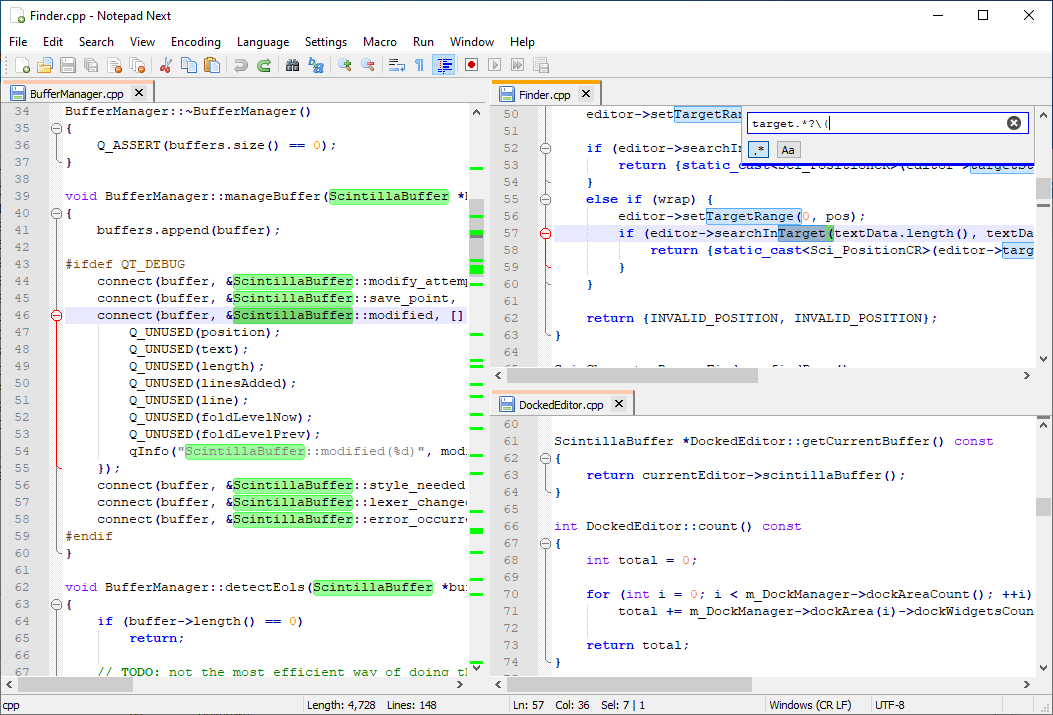
Notepad Next 是一个 C++ 应用程序使用 Qt5 工具包作为其用户界面。与 Notepadqq(另一个类似 Notepad++ 的编辑器)相比,这个应用程序看起来与 Notepad++ 几乎相同。
Notepad Next 旨在模仿 Notepad++ 提供的功能和用户界面。但不应期望提供相同级别的产品,因为 Notepad Next 仍在积极开发中(截至目前为 0.5 版)并且需要一些改进。话虽如此,Notepad Next 在大多数情况下都是可用且稳定的。
软件截图
软件特点
文件夹作为工作区。
支持多种语言,如 C++、YAML、XML、LaTeX、PHP、Python、R、Rust 等。
调整以禁用/启用部分 UI。
支持录制宏,运行它,保存录制的宏。
文件中的查找和替换功能。
线操作。
编辑检查器以获取有关文档的详细信息。
缩进指南。
撤消/重做按钮。
放大/缩小。
Lua 控制台。
EOL 操作。
能够转换大小写。
更新日志
- Added split editor shortcuts.
- Added quick tab controls to the toolbar.
- Added bulk close options for tabs.
- Improved file renaming by pre-filling the rename dialog and correctly removing the old file.
- Added the ability to search and bookmark lines.
- Added a setting to enable or disable auto-completion.
- Improved auto-completion with language keyword suggestions.
- Added
Shift+Enteras a shortcut for backward search. - Added
Shift+Scrollfor horizontal scrolling. - Multiple search results can now be copied at once.
- Improved Find/Replace dialog sizing and behavior on smaller screens.
- Fixed the caret position when opening the context menu inside a text selection.
- Fixed the Unfold All action.
- Fixed an issue where new file names could incorrectly restart instead of incrementing.
- Fixed a crash when a session file cannot be read during startup.
- Added UTF-16 Little Endian and Big Endian encoding support.
- Added initial Windows ARM64 support.
- Improved macOS support, including text navigation key bindings and build reliability.
- Improved Linux AppImage support and added Linux build documentation.
- Updated ADS to version 5.1.1.
- Updated translations across the application.
- Fixed several build and release issues across supported platforms.