 Puresys纯净系统-软件下载
介绍
官方网站:https://github.com/Devolutions/UniGetUI
Winget 是一个很多人都非常熟悉的软件包管理器,但大多数休闲用户由于命令行界面而干脆放弃使用它,这可能看起来令人生畏。那些熟悉这种界面的人会说,它们已经很简单了,但大多数休闲用户仍然喜欢图形用户界面。
WingetUI,正如它的名字所示,为你所有的软件管理需求提供了一个图形界面。无论是安装或删除软件,还是更新你电脑上的现有程序,这个解决方案都支持 Winget、Scoop 和 Chocolatey 作为其软件包管理器,这意味着你将有一个慷慨的程序目录可以查看。
软件截图
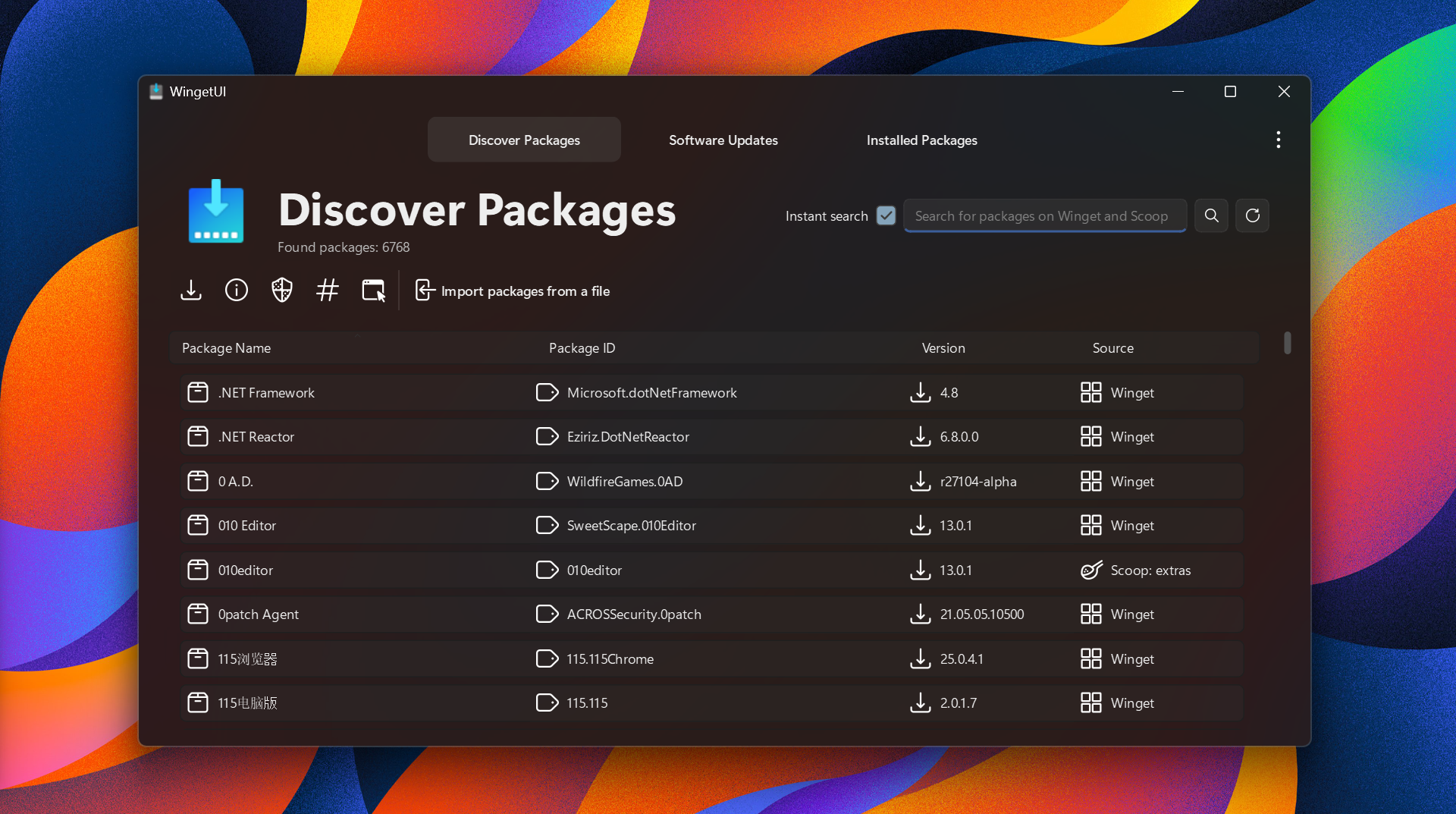
软件特点
- WingetUI 有能力安装、更新和卸载 Winget、Scoop 和 Chocolatey 的软件包。WingetUI 还将检测您的手动安装的应用程序是否可以被更新。
- 它还可以升级和卸载以前安装的软件包–以及卸载内置的 Windows 应用程序。
- WingetUI 有能力导入和导出你选择的软件包,这样你就可以在未来轻松地安装它们。
- WingetUI 支持用一个界面来管理 Scoop buckets。
- 安装一个旧版本的应用程序。
- 当有可用的更新时,WingetUI 会显示一个通知。
- 从它的上下文菜单中管理你的更新和安装的包。
- 用户将被通知一个应用程序的安装/更新/卸载是否成功完成。
- 能够排队安装,以防止冲突。
- 提供了一个黑暗的主题,以防止你的眼睛被灼伤。?
- WingetUI 能够在安装前显示软件包的相关信息(如其许可证、SHA256 哈希值、主页等)。
- 有超过 14000 个可用的软件包(如果 winget、scoop 和 chocolatey 被启用)!
- 更多的功能将在未来推出!
一个适合所有人的软件包管理器
Winge t是一种在你的系统上快速安装众多程序的有效方法,而拥有一个 GUI 使这个过程对所有类型的用户来说都更容易。就用户界面而言,这个界面明显是现代的,而且易于浏览,所以它是一个相当成功的实现。
第一次启动时,你可以选择你喜欢的软件包管理器。Winget 和 Chocolatey 是自动选择的,但你也可以启用 Scoop,这是一个包含实用程序的软件包管理器,为更有经验的用户群服务。
在所有这些之后,是时候翻阅软件目录了。如果说它是慷慨的,那就是低估了它:在所有三个软件包管理器中,有超过 14.000 个软件包可用,所以请随意查找你需要的程序。
不同的安装方式
在你选择了你的软件之后,现在是时候开始安装了。你可以选择让程序为你处理安装,或者你可以通过交互式安装选项手动进行安装。你也可以自由地跳过哈希检查,以加快下载过程。
该工具还有一个软件更新工具,它扫描你电脑上的程序,并通知你任何更新。这为一次大规模更新多个程序提供了一个良好、有效的方法。
你还可以通过 “安装包 “界面卸载一些已安装的程序。选择你想处理的程序,软件会帮助你更快地完成这一过程。
一个更容易访问的 Winget
WingetUI 提供了一个界面,使用户能够有效地利用几个软件包管理器,帮助他们更有效地安装和管理计算机上的软件。
这个项目的主要目标是为 Windows 10 和 Windows 11 的最常见的 CLI 软件包管理器创建一个直观的 GUI,如 Winget、Scoop 和 Chocolatey。有了这个应用程序,你将能够轻松地下载、安装、更新和卸载任何在支持的软件包管理器上发布的软件以及更多。
更新日志
Devolutions UniGetUI 2026.3.3
This release lets you add your own installers to the Software Catalog, adds Extensions starting with Git Repositories, lets you choose package list columns by right-clicking the header, and asks for confirmation before uninstalling or ignoring several packages. It also fixes many WinGet, PowerShell and Scoop update bugs.
New Features
- The Software Catalog can now offer installers: .exe and .msi on Windows, and .pkg, .dmg and .zip on macOS. They are served from a shared folder or a web folder and can be installed, updated and uninstalled like any other package
- The Catalog Editor is now hidden behind its own setting, under Settings > Experimental
- Added Extensions in Settings, starting with Git Repositories. It keeps your local Git clones up to date on their default branch and shows their worktrees and branches. Extensions are off by default.
- You can now choose which columns a package list shows by right-clicking its header. Changes apply right away.
- Added an optional Release date column to package lists.
- You can update an ignored package once from Manage ignored updates, and it stays ignored afterwards.
- Scoop can now install a specific version.
- Added a Release notes item to the right-click menu on Software Updates.
unigetui://packagelinks now open a package's details.- You can now hide the tray icon while UniGetUI keeps running in the background.
- Added an option to quit UniGetUI once automatic updates have finished.
Improvements
- UniGetUI now asks for confirmation before uninstalling packages, and before ignoring updates for several packages at once.
- On first launch, package managers whose tool isn't installed are now turned off, and pages say when no package manager is available instead of reporting that everything is up to date.
- Cargo no longer needs
cargo-binstallorcargo-update. update-allandupdate-managercommands now work in headless mode.- In-app dialogs now close when you click the dimmed area around them.
- Toolbar buttons are disabled when they have nothing to act on.
- The operations panel now counts failed operations separately.
- The search settings in the filter pane are grouped into one collapsed Search options section.
- On macOS, the menu bar icon now matches the menu bar's color, and the window buttons sit inside the glass sidebar.
- Improved Tab and Shift+Tab navigation in tabbed pages.
Bug Fixes
- Fixed Bun packages not being listed when Bun uses a custom install folder.
- Fixed logging out or shutting down on Linux being blocked by UniGetUI.
- Fixed long translated labels being cut off on the package details action button.
- Fixed npm not being found on macOS when it is installed through nvm.
- Fixed operations that need administrator rights failing in headless mode.
- Fixed Store and MSIX apps showing names like
ms-resource:AppStoreName. - Fixed the Close button stopping short of the window's right edge.
- Fixed the swapped package counts in the page subtitle.
- Fixed updates not appearing for packages with very large version numbers, such as Scoop nightly builds.
- Fixed updates running even when an app listed under "Close apps before installing" couldn't be closed.
Thank you to everyone who reported issues and contributed improvements to the project.


标题名字填错了 是UniGetUI(旧名称:WingetUI)