 Puresys纯净系统-软件下载
介绍
官方网站:https://dbeaver.io/
DBeaver 适用于开发人员,SQL 程序员,数据库管理员和分析人员的免费多平台数据库工具。支持任何具有 JDBC 驱动程序的数据库(基本上意味着- ANY 数据库)。EE 版本还支持非 JDBC 数据源(MongoDB,Cassandra,Couchbase,Redis,BigTable,DynamoDB 等)。
DBeaver 具有很多功能,包括元数据编辑器,SQL 编辑器,丰富的数据编辑器,ERD,数据导出/导入/迁移,SQL执行计划等。DBeaver 基于 Eclipse 平台开发。
使用插件架构,并为以下数据库提供附加功能:MySQL / MariaDB,PostgreSQL,Greenplum,Oracle,DB2 LUW,Exasol,SQL Server,Sybase / SAP ASE,SQLite,Firebird,H2,HSQLDB,Derby,Teradata,Vertica,Netezza ,Informix 等。
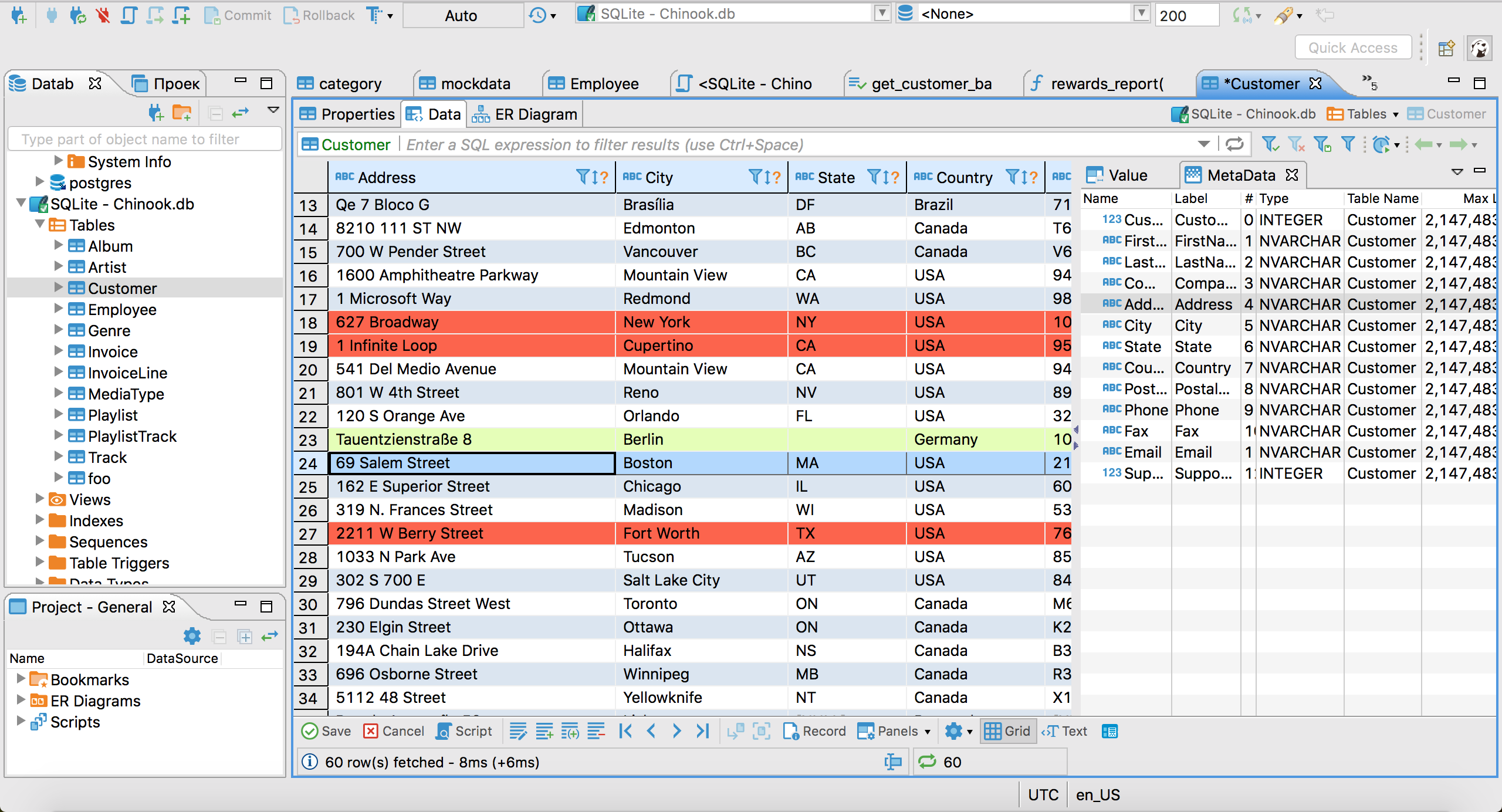
软件截图
软件特点
DBeaver 是一款免费开源的数据库管理工具,支持多种数据库,如 MySQL、Oracle、PostgreSQL 等。该软件拥有丰富的功能和工具,可以满足用户的多种需求。
以下是 DBeaver 软件的一些功能特色:
- 数据库连接:DBeaver 软件支持多种数据库连接方式,包括本地和远程数据库连接,可以便捷地连接到不同的数据库进行管理。
- 数据库浏览器:该软件提供了一个直观的数据库浏览器,可以快速浏览和搜索数据库中的表、视图、过程、函数等对象。
- SQL 编辑器:DBeaver 软件提供了一个强大的 SQL 编辑器,可以编写和执行 SQL 查询和脚本,并支持语法高亮和代码提示等功能。
- 数据导入和导出:该软件支持多种数据导入和导出格式,包括 CSV、Excel、HTML、JSON 等,可以方便地将数据转换为所需的格式。
- 数据库管理:DBeaver 软件提供了多种数据库管理功能,如表格编辑、索引管理、用户管理等,可以方便地管理数据库。
- 插件支持:该软件支持多种插件,可以扩展软件的功能和工具,如代码生成器、数据模型器等。
DBeaver 是一款简单,可靠的软件,面向需要管理多个SQL数据库,执行SQL脚本,迁移连接和查看图的用户。
兼容多个数据库系统
不管您选择连接哪个数据库,例如 MySQL,Firebird,MS Access,PostgreSQL,SQLite或DB2,该应用程序都支持多个连接,因此您可以轻松地管理和组织表,视图,触发器和过程。
首次启动 DBeaver 时,可以选择一种新的连接类型,然后指定允许您连接到所选数据库的信息。之后,位于应用程序左窗格中的“数据库导航器”面板将显示所有可用数据库以及它们的触发器,索引和表。
如果选择一个表,则可以查看有关该表的常规详细信息,例如列,外键,使用的触发器,分区甚至DDL语法(用于定义数据结构,尤其是数据库模式)。
轻松创建 SQL 脚本
通过“项目”面板,您可以查看所有可用的连接以及创建的脚本。此外,还可以通过使用从“SQL编辑器”菜单中的合适的选择创建新的 SQL 脚本。
通过访问“数据库”菜单,您可以添加新连接,将事务处理模式更改为“可序列化”,“可重复读取”或“已提交读取”。另外,您可以使用“驱动器管理器”选项来管理每个数据库的 ODBC 驱动程序。这样,您可以指定驱动程序名称,选择其类别,设置其示例 URL 地址,然后添加新库。这样的驱动器充当应用程序和 DBMS 之间的转换层,因此您可以轻松地连接到特定的数据库。
作为便携式实用程序,您可以随身携带该应用程序,无论它在可移动驱动器上何时何地,都可以在任何计算机上使用。因此,它不会创建注册表项,您只需删除其包含的文件夹即可将其删除。
DBeaver 软件是一款功能强大、操作简单的数据库管理工具,可以满足用户的多种需求。如果你需要进行数据库管理、查询和开发等操作,不妨试试 DBeaver 软件,相信你会喜欢上它的便捷和高效。
更新日志
- AI Assistant:
- Redesigned the AI engine selector with a native drop-down, engine icons, and improved keyboard accessibility
- Fixed model discovery for self-hosted OpenAI-compatible endpoints with non-OpenAI model names
- Improved error messages for HTTP redirects from custom OpenAI-compatible endpoints by showing the redirect target and configuration guidance
- Fixed model listing and chat requests for self-hosted OpenAI-compatible endpoints when the base URL has no trailing slash (thanks to @Ashfaqbs)
- Improved guidance and validation when the custom AI scope contains no database objects
- Fixed an issue on macOS where opening the AI profile or model picker could immediately select an item
- SQL Editor:
- Added a setting to choose whether Enter, Tab, both, or neither accepts autocomplete suggestions
- Added a preference to disable the large-script result-fetch warning (thanks to @akmalsyrf)
- Fixed SQL Editor toolbar background colors for color-coded connections in the dark theme
- Metadata Editor:
- Fixed invalid table DDL generation when column comments contain double hyphens (thanks to @MicBun)
- Data Editor:
- Made the issue-reporting link clickable when the calendar editor encounters an unsupported date/time value
- Fixed spacing and background inconsistencies in the virtual structure editor
- Connectivity:
- The connection wizard now prompts users to choose a connector when the selected database has multiple options
- Improved navigation between project and global network profile settings
- Improved the confirmation dialog for removing a network handler
- Navigator:
- Restored context menus for breadcrumbs in object editors and the status bar
- Fixed a startup freeze when Database Navigator was in a detached window
- Miscellaneous:
- Fixed a Linux startup crash when the Product Configuration wizard opened
- Redesigned and reorganized the General preferences page
- Improved Preferences search by adding keywords to preference pages
- Fixed inaccurate progress reporting during native tool file transformations (thanks to @cuishuang)
- Fixed overly bright hover highlighting for view minimize and maximize buttons on Windows in the dark theme
- Improved editor tab visibility by adding separators between unselected tabs
- Fixed excessive accumulation of temporary files and improved cleanup of abandoned files
- Fixed diagnostic archive collection to include all rotated log files
- Fixed version-update controls to prevent duplicate downloads and keep the update button correctly positioned
- Improved drop-down list sizing, scrolling, and theme colors
- Improved UI color updates after changing the application theme without restarting DBeaver
- Improved the contrast of inactive editor tabs for color-coded connections in the dark theme
- Added theme selection with live preview to the User Interface preferences
- Databases:
- Apache Doris: Fixed CSV import into schemas and post-import table refresh
- GBase 8s:
- Fixed JSON value handling in the "Copy As SQL" command (thanks to @Downstream1998)
- Fixed the Columns tab failing to load when the read_defaultstr routine is unavailable (thanks to @sakshichitnis27)
- PostgreSQL: Added support for viewing and managing the PUBLIC pseudo-role in Permissions tabs (thanks to @NikRom5531)
- TiDB Cloud Lake: Added the TiDB logo to the connection page (thanks to @akshar27)
- Timeplus: Fixed incorrect numeric values and intermittent hangs during CSV import (thanks to @EastLord)



这个怎么没exe的安装版了,解压覆盖会报错,插件得重新下载